

Internal Linking for Small Business Websites: The SEO Fix Hiding in Plain Sight
By
Jeromy Schall, Founder of Future Site Designs
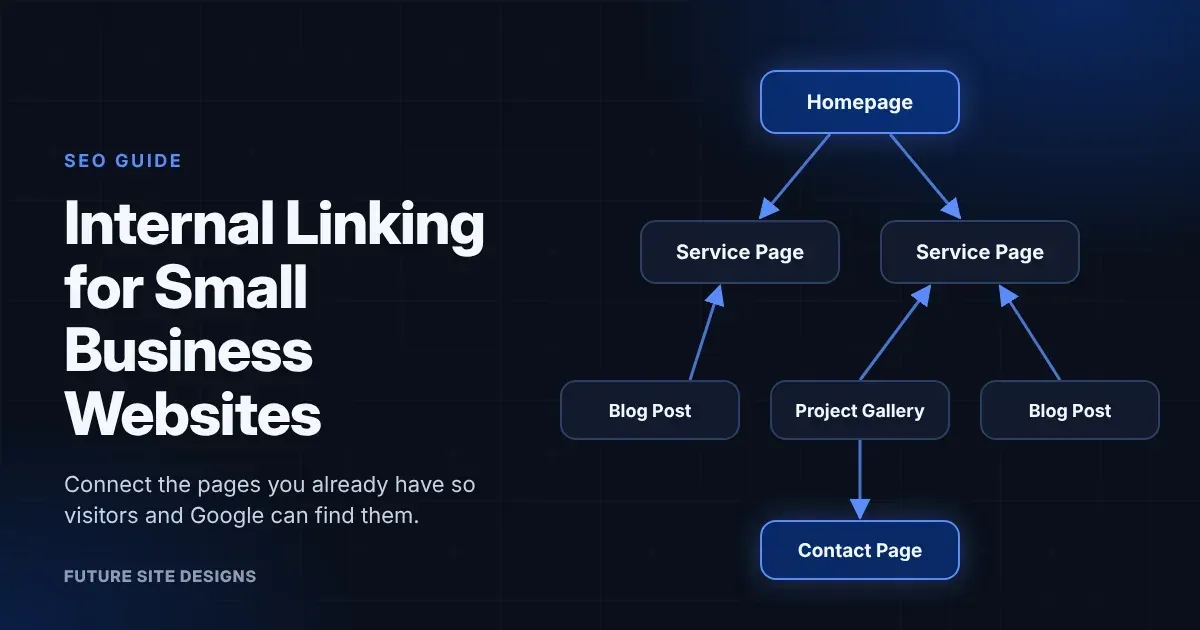
Internal links are links from one page on your website to another page on the same website. They help visitors find what they need, and they help Google discover your pages and understand what each one is about.
Most small business websites already have the pieces: service pages, a few blog posts, a project gallery, a contact page. What’s often missing is the connection between them.
This guide covers three things:
- How to find the right pages to link from
- How to write links that make sense to readers and to Google
- What the popular “site:” search tip gets wrong
What Internal Linking Does for Your Website
Internal links do two jobs.
For visitors, they give a clear next step. Nobody has to dig through the menu to find the service you just mentioned.
For Google, links are how pages get found and understood. Google uses links to discover new pages and to judge how relevant a page is. Its link best practices recommend that every page you care about be linked from at least one other page on your site.
Internal linking isn’t a ranking switch you flip. It’s one part of a website that’s organized and easy to use. Content quality, technical health, and mobile page speed still matter.
The Viral “site:” Search Tip, and What It Gets Wrong
You may have seen this tip on social media:
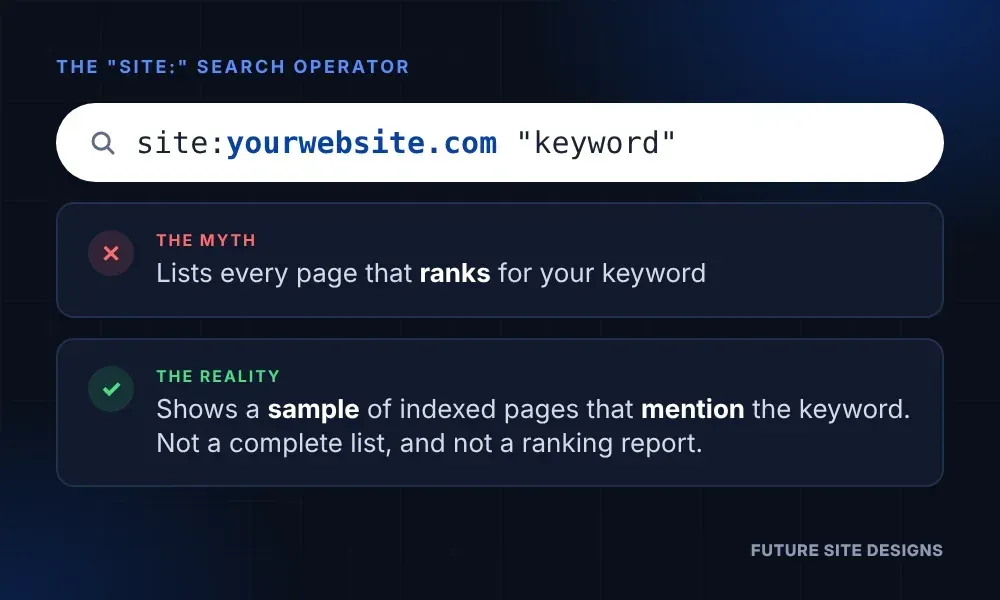
- Search Google for site:yourwebsite.com “your keyword”
- Link from every page in the results to the page you want to rank
Linking from related pages is a good idea. The explanation needs a correction.
- It shows pages that mention your keyword, not pages that rank for it. A page can contain a word without ranking for it.
- It’s a sample, not a complete list. Google’s own site: operator documentation says the results aren’t guaranteed to include every indexed page.
The “site:” search is still useful for spotting pages that mention a topic. For a more reliable list, use Google Search Console.
How to Find Internal Linking Opportunities in Google Search Console
Search Console shows the searches your pages actually appear for. That makes it the better tool for choosing which pages to link from.
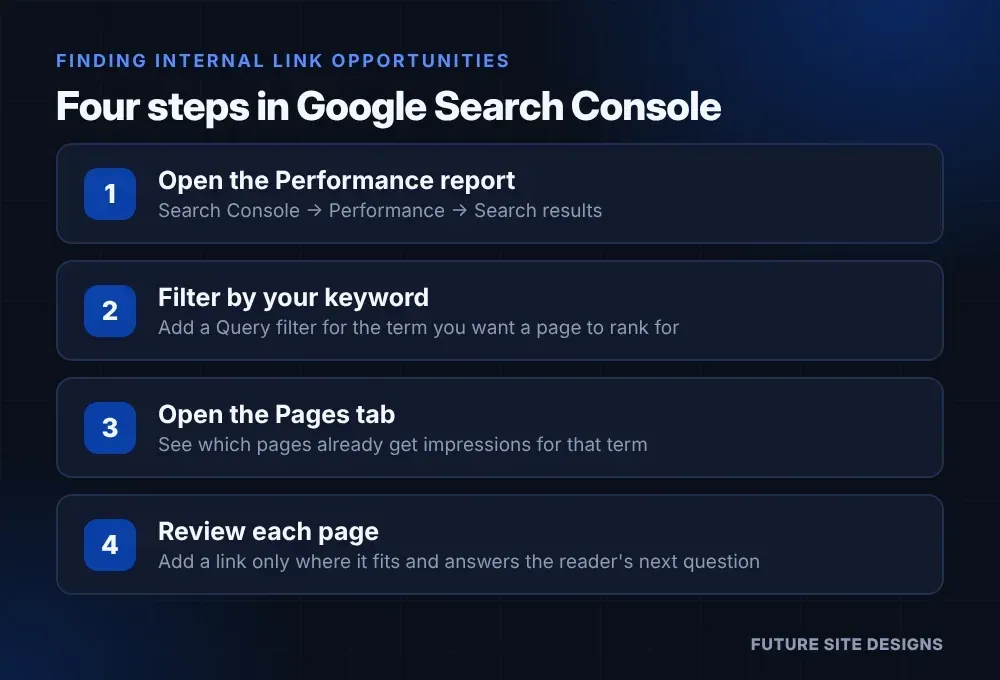
- Open the Performance report. Go to Performance → Search results. Google’s Performance report guide explains each part of the screen.
- Filter by your keyword. Add a Query filter for the term you want a page to rank for.
- Open the Pages tab. These are the pages that have shown up in search for that term. Treat them as candidates to review, not an automatic list of places to add links.
- Review each page. Add a link only where the page is relevant to the topic and the link answers the reader’s next question. If it doesn’t fit naturally, skip that page.
If a page other than the one you want is getting most of the impressions, decide which page should own that topic before adding links. More on that in the mistakes section below.
If you’re in Search Console because your traffic fell, that’s a different problem. Start with my guide on why website traffic drops.
How to Add Internal Links That Actually Help
Put the Link Inside the Paragraph
Menus and footers link to the same pages from everywhere. A link inside your body copy is different: the sentence around it explains why it’s there. Google recommends using surrounding text to give each link context.
Write Anchor Text That Describes the Destination
Anchor text is the clickable wording of a link.
Instead of:
“To learn more, click here.”
Try:
“See our kitchen remodeling services.”
Google’s guidance is to keep anchor text descriptive, reasonably short, and relevant to the page it points to. Phrases like “click here” give readers and search engines very little to go on.
Vary the Wording
Don’t repeat the exact same keyword in every link. Use the main phrase sometimes, close variations other times, and natural wording that fits the sentence. Google specifically warns against stuffing anchor text with keywords.
Link to the Page That Answers the Question
Before you add a link, make sure the destination delivers what the anchor text promises. A link that says “remodeling costs” should land on a page about remodeling costs.
Go Back to Your Older Posts
When you publish something new, find a few older posts on related topics and add a link to the new page. Links from relevant existing pages give search engines another path to discover the new content.
What a Connected Small Business Website Looks Like
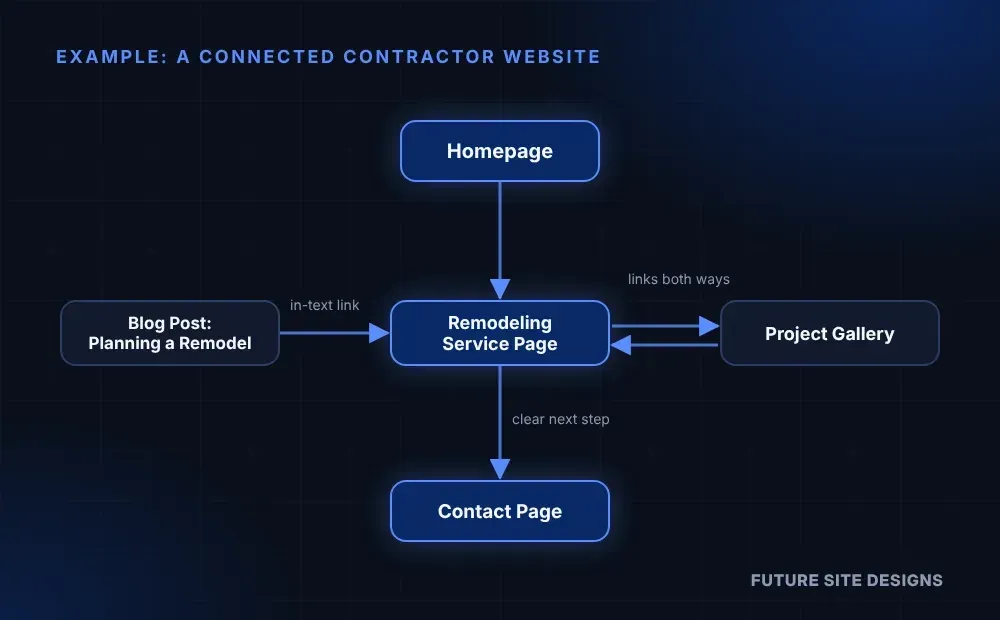
Picture a remodeling contractor with five pages: a homepage, a remodeling service page, a project gallery, a blog post about planning a remodel, and a contact page.
Here’s how those pages connect:
- The homepage links to the remodeling service page.
- The blog post links to the service page in the paragraph about choosing a contractor.
- The service page and the project gallery link to each other.
- The service page gives a clear next step to the contact page.
Every link answers the visitor’s next question.
For contractors, this structure is a strong starting point. We cover more on our contractor web design page.
Common Internal Linking Mistakes
- Linking only from the menu and footer. Those links help navigation but carry no context.
- Using “click here” everywhere. It tells nobody where the link goes.
- Repeating the exact same keyword in every link. Mix it up so it reads naturally.
- Leaving orphan pages. An orphan page has no internal links pointing to it. Google may still find it through your sitemap, but visitors won’t.
- Letting two pages compete for the same topic. This is called keyword cannibalization. When two of your pages target the same search, they can work against each other. Pick one page to own the topic and link to it from the other.
- Linking to unrelated pages. A link should help the reader, not just add to a link count.
- Expecting links to fix everything. Internal linking works alongside good content, solid technical setup, and a fast site.
Internal Linking Questions, Answered
How many internal links should a page have?
There’s no set number. Google’s link guidance doesn’t name one. Add links where they help the reader. If a page has so many links that none stand out, that’s a sign to cut back.
Do menu and footer links count as internal links?
Yes. They matter for navigation. Links inside your body copy, though, come with a sentence that explains why the reader should click.
What is an orphan page?
An orphan page is a page that no other page on your website links to. If it’s an important page, like a service page, give it at least one link from a related page.
Should I link to other websites, too?
Yes, when the source is trustworthy and helps the reader. Google’s SEO Starter Guide suggests linking to sites you trust and adding a nofollow annotation to ones you don’t want to vouch for.
Do internal links help AI tools find my pages?
AI tools can only reference pages they can find and understand, and clear internal links help with both. No link structure guarantees a mention, though. For more on how these tools choose which businesses to name, read why AI search can’t find some businesses.
Want to Know Which Pages on Your Site Should Be Linking to Each Other?
Start with a Free AI Website Audit. It’s a practical first step for spotting what deserves attention and deciding what to fix first.
If you’d rather hand off the ongoing work, site structure is part of our AI-Driven SEO services.
Future Site Designs Knowledge Center
About the Author: Jeromy Schall
Jeromy has run Future Site Designs since 1998. He leads client strategy, writes the Knowledge Center articles on web design, AI SEO and website security, and documents his technical work in published case studies.
Future Site Designs Knowledge Center



About the Author: Jeromy Schall
Jeromy Schall founded Future Site Designs, an Orlando web design and digital marketing agency, in 1998. His work focuses on website development, technical SEO, website performance, and digital strategies that help businesses reach customers online.
Digital Strategist and Founder
Jeromy has led Future Site Designs since 1998, from static HTML sites to today’s AI-driven search. He shares practical guidance in the
Knowledge Center on AI-driven SEO, website design, search visibility, and mobile performance.
Website Strategy and Client Leadership
eromy leads sales and client strategy directly and is the point of contact on every project. Each site is planned around what the client’s business needs to grow, with clear communication and practical recommendations throughout.
AI-Driven SEO and Web Engineering
Jeromy builds exclusively on the Duda platform, hosted on AWS. His expertise includes technical SEO, website performance, secure website infrastructure, and structuring content so it’s eligible to be cited by AI Overviews, ChatGPT, Gemini and Perplexity. Future Site Designs also provides white-label website development for agencies.
Media Production and Broadcasting
Beyond the agency, Jeromy is an active broadcaster and media producer in the international waterskiing community, covering world-class competitions. That hands-on media experience feeds directly into the agency’s video production work.